

Most organizations have a version of the same problem. Somewhere in the business, there’s a process that runs on a combination of spreadsheets, emails, and shared drives. Approvals happen through email chains that nobody can track. Reports get built by hand every week, pulling from three different places.
These problems persist even when organizations have invested in modern software. Why? Because off-the-shelf tools are built for general use cases, not your specific workflows. The gap between what your software does and what your team actually needs is often filled by workarounds. Power Apps is designed to close that gap. It gives teams a way to build purpose-built tools without going through a full custom development project.
What is Microsoft Power Apps?
Power Apps is a low-code application development platform that sits within Microsoft’s Power Platform. It lets people build custom business applications without needing to write traditional software code.
“Low-code” means the platform handles a lot of the technical complexity for you. Someone with a solid understanding of a business process can build a working app, often without needing a developer to do it for them. That said, low-code doesn’t mean zero skill. More complex apps, ones with sophisticated logic, advanced integrations, or high security requirements, will benefit from developer involvement.
Best Power Apps Use-Cases
Power Apps tends to shine for processes that are too important to keep running on spreadsheets, but too small or too specific to justify a full custom software build.
Here are some common signs a process might be a good fit:
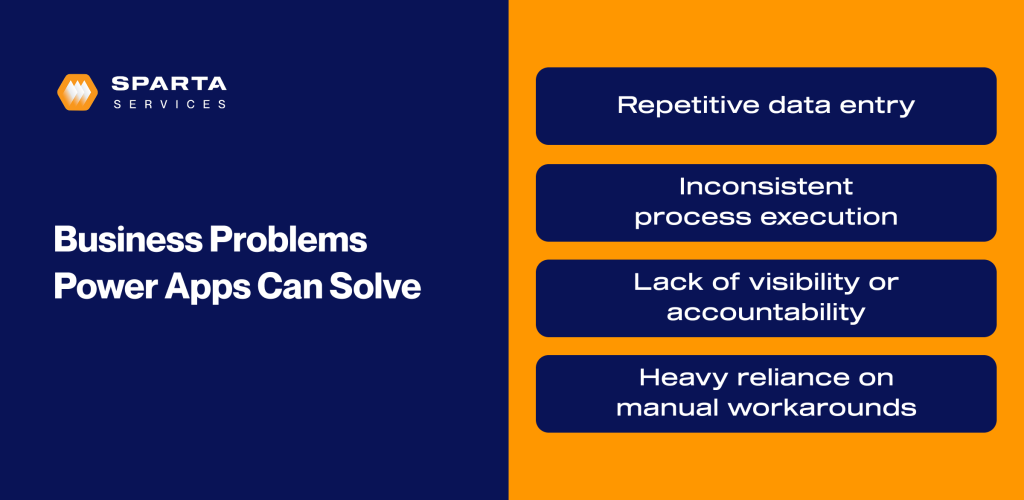
- Repetitive data entry – If people are regularly copying information between systems, filling out the same forms, or manually moving data from one place to another, an app can handle that more reliably and with far less effort.
- Inconsistent process execution – When a process depends on people remembering what to do next, or when different people follow it differently, an app can enforce a consistent path, making sure nothing gets skipped.
- Lack of visibility or accountability – When nobody knows where a request stands, or who last touched something, an app with a proper data trail can solve that quickly.
- Heavy reliance on manual workarounds – If your team has built a seven-tab spreadsheet with color-coded rows and a shared inbox to manage something, that’s usually a sign the process has outgrown its tools.
One example of this in practice is a Power App developed by Sparta to streamline invoice processing using Azure OpenAI. In under four months, the solution processed over 13,500 invoices, with more than 99% handled automatically. This reduced manual effort, improved accuracy, and enabled a faster, more scalable approach to invoice routing and approvals.
What Kind of Apps Can You Build with Power Apps?
The range is wider than most people expect when they first encounter Power Apps. Some common categories include:
- Data capture and submission – Forms that replace paper or email, such as inspection reports, incident logs, expense submissions, request forms. These apps collect structured data and route it where it needs to go.
- Process and workflow support – Apps that walk users through a process step by step, trigger approvals, and send notifications when actions are needed. Think purchase approvals, onboarding checklists, or quality review workflows.
- Task and queue management – Apps that show a team what work is assigned and what’s been completed, giving supervisors and team members a shared view of the work in progress.
- Operational tracking – Apps that track assets, inventory, equipment status, or project progress, giving teams real-time visibility without manual reporting.
- AI-Enhanced Business Apps – Power Apps can support AI-driven experiences such as document data extraction, recommended next steps, or more conversational app interactions through Microsoft’s expanding Copilot and AI capabilities.
Canvas Apps vs Model‑Driven Apps in Power Apps
When exploring Power Apps, you’ll quickly encounter two terms, canvas apps and model-driven apps.
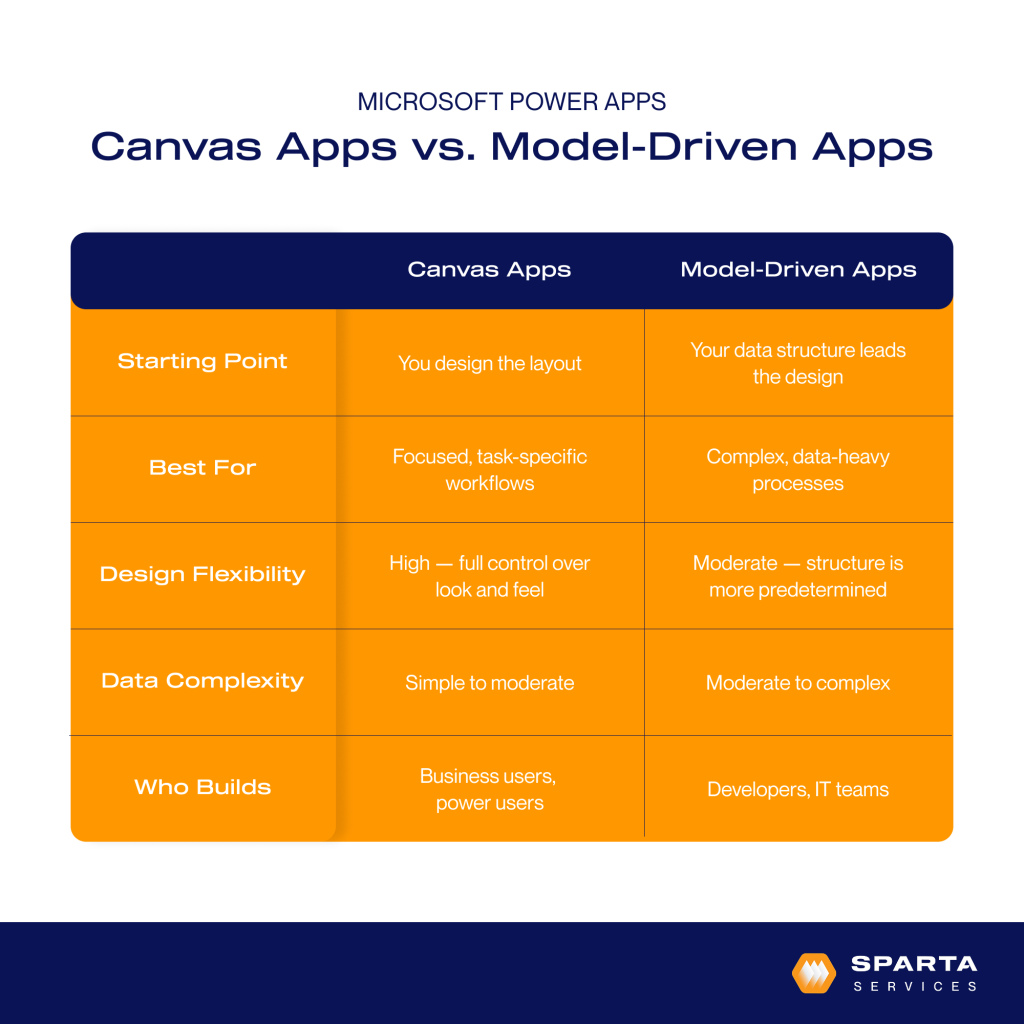
Canvas apps give you complete control over the design. You start with a blank screen and build the layout yourself, defining exactly how the app looks and flows. This approach works well when user experience is a priority or when the underlying data structure is relatively simple.
Model-driven apps work the other way around. The structure of your data shapes the app. If you’re working with Microsoft Dataverse and have already defined your data tables, relationships, and business rules, a model-driven app builds on top of that foundation. You get less control over layout, but you get consistency and more sophisticated data relationship handling. This approach tends to work well for more complex, data-heavy scenarios.
Most organizations don’t need to make this decision upfront, and in practice, many use both types for different purposes. The right choice depends on the specific problem you’re solving, which is why it helps to understand the business process thoroughly before deciding which approach to take.
How Power Apps Fits Into the Microsoft Ecosystem
Power Apps is part of Microsoft Power Platform, which also includes Power Automate, Power BI, and Power Pages. These tools are designed to work together. A Power App might use Power Automate to trigger emails and notifications. The same data that powers the app might feed into a Power BI dashboard that gives leadership a high-level view. This integration matters because it means you’re building within an ecosystem rather than creating standalone tools that sit apart from everything else.
Power Apps also connects natively to SharePoint, Microsoft 365, SQL Server, Dynamics 365, Teams, Dataverse, and hundreds of other systems through built-in connectors. So rather than rebuilding your data infrastructure, you’re building interfaces and workflows on top of what already exists.
Microsoft is increasingly embedding AI and Copilot capabilities across the Power Platform. Within Power Apps, AI-assisted app building and natural language functionality can help accelerate development and improve user experience, while Copilot across Microsoft 365 can work alongside the workflows and data surfaced through Power Platform solutions.
Data Security and Governance in Power Apps
When you start building apps that sit across systems and processes, data security becomes part of the conversation quickly.
Because Power Apps sits within the Microsoft ecosystem, it uses the same underlying security model most organizations already rely on. That includes role-based access controls, Azure Active Directory, and environment-level governance, so you can control who has access to what, and where data is being used.
There are also built-in controls to manage how data moves between systems. For example, data loss prevention policies let you define which connectors can be used together, helping prevent sensitive information from being shared in ways you didn’t intend.
In practice, this means you’re not creating standalone apps with their own security risks. You’re extending your existing environment, with the same guardrails already in place.
Common Questions Organizations Ask About Power Apps
Is Power Apps only for “citizen developers” — people without technical backgrounds?
No. Power Apps is designed to support a range of users, from business analysts building simple tools to professional developers building sophisticated enterprise applications.
Can Power Apps scale beyond a single team?
Yes, though scaling well requires planning. Organizations that start with one or two apps and gradually expand typically do better than those that try to build everything at once.
How are security and permissions handled?
Power Apps uses Microsoft’s security model, including role-based access controls and Azure Active Directory integration. Admins can control who builds apps, who uses them, and what data they can access. Dataverse, the underlying data platform, adds additional security layers for more sensitive scenarios.
What are the limitations of Power Apps?
Power Apps is not a replacement for large enterprise systems. Very high-volume transaction processing, extremely complex business logic, or applications that need deep customization at the infrastructure level may push beyond what Power Apps handles well. Licensing costs can also add up as the number of users grows.
Does using Power Apps replace traditional development?
No. Power Apps can reduce the amount of custom development needed for many common scenarios, but it works alongside traditional development rather than replacing it. Developers often play an important role in more complex Power Apps projects.
The Role of Strategy in Power Apps Projects
Successful Power Apps projects rarely start with the technology. They start with strategy. A clear understanding of the process and what a better outcome actually looks like. Skipping that step is one of the most common reasons Power Apps initiatives underdeliver. An app built on a poorly understood process tends to digitize the problem rather than solve it.
This is especially important as organizations look to incorporate AI and Copilot capabilities into business processes. Without a well-structured underlying process and data model, layering AI on top rarely delivers meaningful value.
Getting Started with Power Apps
Think of Power Apps as an evolution, not a major one-time project. Start small, then scale as you go. A focused first project is more likely to succeed and build confidence than an ambitious multi-department rollout.
It’s also worth evaluating fit before building. Power Apps is a strong option for many scenarios, but it’s not the right tool for every situation. Taking time to assess whether it genuinely matches your problem saves effort later.
Start Your Microsoft Power Apps Evolution
If you’re trying to figure out whether Power Apps makes sense for your organization, Sparta helps organizations work through exactly any questions around Power Apps so you can confidently build. Contact us for a complimentary demo.

Dave Galy
Dave Galy is the founder and CEO of Sparta Services