

Enterprise AI adoption has crossed a threshold. According to recent industry data, 88% of enterprises are now using AI, and 71% have generative AI running in at least one business function. Organizations that have moved past pilots and into production are seeing an average return of nearly six times their investment within 14 months. But as AI becomes operational rather than experimental, one question keeps coming up in conversations with our clients: which AI should we be using should we be using: Microsoft Copilot vs Claude AI, or both? We’ll explain how each platform is built, where each one excels, and how to make the right decision for your organization.
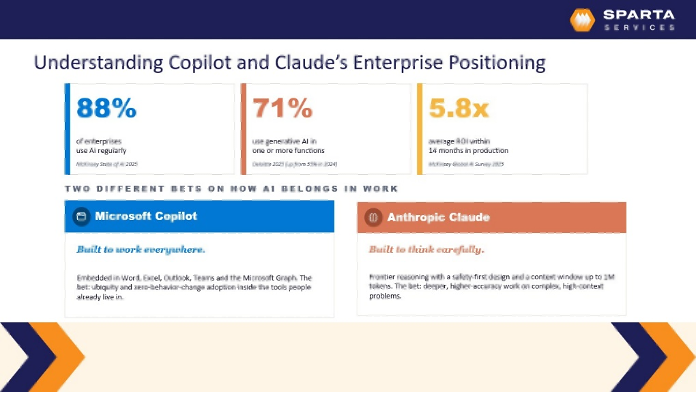
Copilot vs Claude: Two Different Bets on How AI Should Work
Before comparing features, it helps to understand the philosophy behind each platform.
Microsoft Copilot is built for ubiquity. It lives inside the tools your team already uses every day: Word, Excel, Outlook, Teams, and SharePoint. It understands your organizational context, respects your existing permissions, and surfaces AI assistance without requiring additional setup or file uploads. The idea is that AI should meet people exactly where they already are.
Claude, built by Anthropic, takes a different approach. With a safety-first architecture and a context window of up to one million tokens, Claude is optimized for depth. It handles complex, high-cognitive-load tasks with greater accuracy and nuance. Legal research, long document analysis, code review, and strategic planning are the workloads where Claude consistently stands out.
These platforms are not competing to be the best AI. They are competing to be the best AI for different jobs.
Understanding that distinction is the most important step in building a sound AI strategy for your organization.
What Business Leaders Are Actually Using AI For
We recently hosted a live webinar on this topic and polled attendees throughout the session. The results challenged some common assumptions about how enterprise AI is actually being used.
When asked about their primary AI use case at work:
- Data analysis and research came in first at 47%
- Writing and content creation followed at 36%
- Customer support accounted for 10%
- Coding and development came in at 5%
Nearly half of respondents are relying on AI for analytical work, not just drafting emails or summarizing meetings. That matters significantly when choosing between Claude and Copilot, because analytical workloads push up against Copilot’s limits and play directly to Claude’s strengths.
We also asked attendees what capability matters most in an AI assistant:
- Customizable behavior for their team’s workflows led at 41%
- Safety, reliability, and fewer hallucinations came in at 29%
- Stronger reasoning on complex tasks was cited by 25%
- Handling long documents and large context was selected by 4%
The top answer tells us something important. Organizations have moved past “does AI work” and are now asking “can AI work the way we work.” That is a meaningful shift in maturity, and it shapes how you should approach your deployment.
The Case for Microsoft Copilot
Copilot’s strongest argument is adoption speed. If your team already lives in Microsoft 365, Copilot removes almost every barrier to getting started.
It operates directly within your existing applications, inherits your Microsoft 365 security boundaries, respects sensitivity labels, DLP policies, and Entra ID permissions, and integrates natively with Microsoft Purview for compliance management. Users can generate documents, analyze spreadsheets, summarize meetings, and draft presentations without ever uploading a file or leaving the tools they already know.
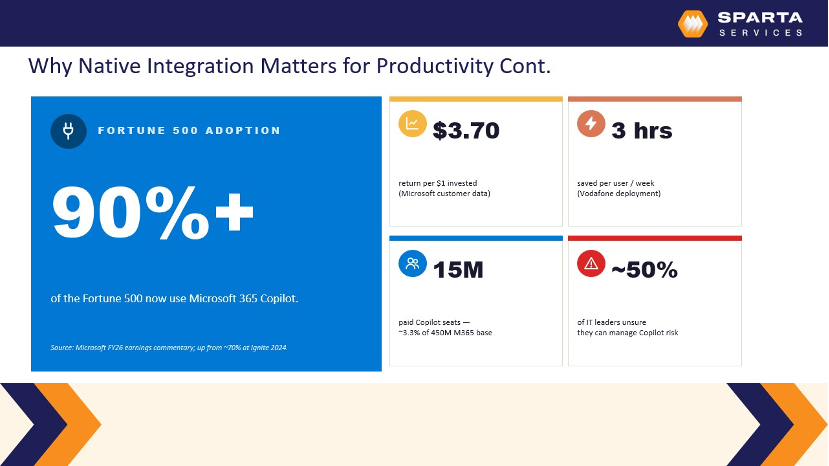
Early data supports the value. More than 90% of Fortune 500 companies are now using Copilot, with organizations reporting an average of three hours saved per person per week.
For Microsoft-centric organizations with mature M365 environments, Copilot delivers fast, broad productivity gains with minimal disruption and change management overhead.
The trade-off: results can be inconsistent on more complex tasks, and per-seat licensing applies regardless of usage. If only a portion of your team requires advanced AI capabilities, that model may not be cost-efficient.
The Case for Claude
Claude’s case is built on what happens when the task gets hard.
Its expanded context window means it can process an entire contract, codebase, or research repository in a single interaction. For engineering, legal, and research-heavy teams, that is not a nice-to-have. It is a prerequisite.
Claude Enterprise offers comparable data privacy commitments to Copilot: no training on customer data, configurable retention policies, and SOC 2 Type II and ISO certifications. Usage-based pricing also makes it more flexible for organizations where advanced AI use is concentrated in specific roles rather than spread across the entire workforce.
The trade-off: Claude does not sit natively inside your Office applications. Integrating it with Microsoft workflows requires additional setup. Tools like Cowork help bridge that gap, but it introduces more implementation complexity than Copilot’s embedded experience.
Most Organizations Will Use Both
This was the clearest takeaway from our webinar, and it reflects what we are increasingly seeing with our clients.
Copilot handles the everyday: email drafts, meeting summaries, quick document generation across the full workforce. Claude handles the heavy lifting: complex analysis, long-form research, and specialized workflows for legal, finance, or engineering teams.
The goal is not to pick a winner. It is to match the tool to the task, and build a strategy around how your specific teams actually work.
Increasingly, organizations are deploying Copilot broadly for general productivity while making Claude available to the roles where deeper reasoning drives real business value. That dual-platform approach, done intentionally, delivers far better outcomes than forcing one tool to serve every use case.
AI Readiness: The Variable That Determines Whether Any of This Works
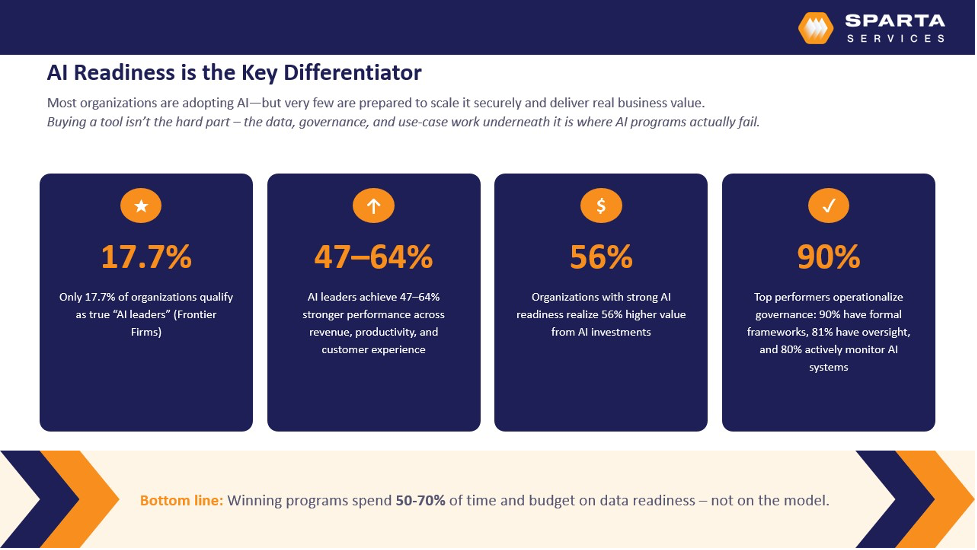
Here is the reality that often gets overlooked in the Claude vs Copilot conversation: neither platform will deliver consistent value if your data foundation is not ready.
Only 18% of organizations qualify as true AI leaders. What separates them from everyone else is not which AI tool they chose. It is governance maturity. 90% of top performers have formal governance frameworks in place. 81% maintain active oversight. 80% continuously monitor their AI systems.
AI does not fix your data problems. It amplifies them.
If your data is messy, your permissions are over-shared, or your classification structures are inconsistent, AI will surface those problems faster and with greater confidence. We see this pattern repeatedly across industries. Companies invest in AI tooling, but the underlying data quality, organizational alignment, and governance maturity are not there yet, and the results fall short of expectations.
The organizations that get the most from AI treat it as a data and governance initiative first, and a technology initiative second. That means establishing foundational identity controls, data classification, and access policies before scaling deployment, not after.
Before deploying either Copilot or Claude at scale, your organization should assess:
- Security posture and identity controls: Are your access permissions correctly scoped and enforced? Oversharing is one of the most common risks we identify in AI readiness assessments.
- Data classification maturity: Is sensitive information properly labeled and governed? Copilot in particular relies heavily on your Microsoft Purview configuration to function safely.
- Compliance obligations: Regulated industries such as healthcare, legal, and finance require additional care in how AI tools access and process organizational data.
- Change management readiness: Technology is only part of the equation. User training and clear governance policies are what make adoption stick.
Choosing the Right Path for Your Organization
The Claude vs Copilot question does not have a single right answer. It has a right framework.
If your team primarily works in Microsoft 365 and you want fast, broad productivity gains with minimal disruption, Copilot is the natural starting point. If your highest-value work involves deep analytics, long documents, complex code, or strategic research, Claude is built for exactly that purpose.
And if you want to scale AI across your organization safely and effectively, you will likely benefit from both, backed by the right governance foundation from day one.
At Sparta Services, we help organizations assess where they are today, build the right security and governance foundation, and deploy AI tools in a way that delivers real, measurable outcomes. Whether that means rolling out Copilot across your Microsoft environment, building custom integrations with Claude, or developing a dual-platform strategy, we tailor our approach to your specific needs.
Watch the full webinar recording to hear the live discussion and Q&A, or contact us to schedule a complimentary AI Readiness Consultation.

Dave Galy
Dave Galy is the founder and CEO of Sparta Services